


At a glance
Expert's Rating
Pros
- By far the fastest SSD in random write operations
- Very affordable for a PCIe 5.0 DRAM design
- Better-than-average TBW rating
- Optional high-quality heat spreader included
Cons
- Just a hair off the competition in real-world transfers
Our Verdict
If you’re looking for a PCIe 5.0 SSD to run your operating system from, there’s nothing better than the XPG Mars 980 Blade. It’s more than worthy in other performance aspects as well, and currently priced below the competition.
Price When Reviewed
This value will show the geolocated pricing text for product undefined
Best Pricing Today
Best Prices Today: XPG Mars 980 Blade
So when exactly did 2280 M.2 NVMe SSDs become “Blades”? Likely around the time the marketing gurus at Adata (XPG’s parent) decided gamers would buy more if they were named as such. PR-speak aside, the Mars 980 Blade offers the speed and grace of a gazelle. We can play that game as well.
(And yes, I know “blade” is a common term in computer circles for anything thinner than the norm.)
Read on to learn more, then see our roundup of the best SSDs for comparison.
What are the XPG Mars 980 Blade’s features?
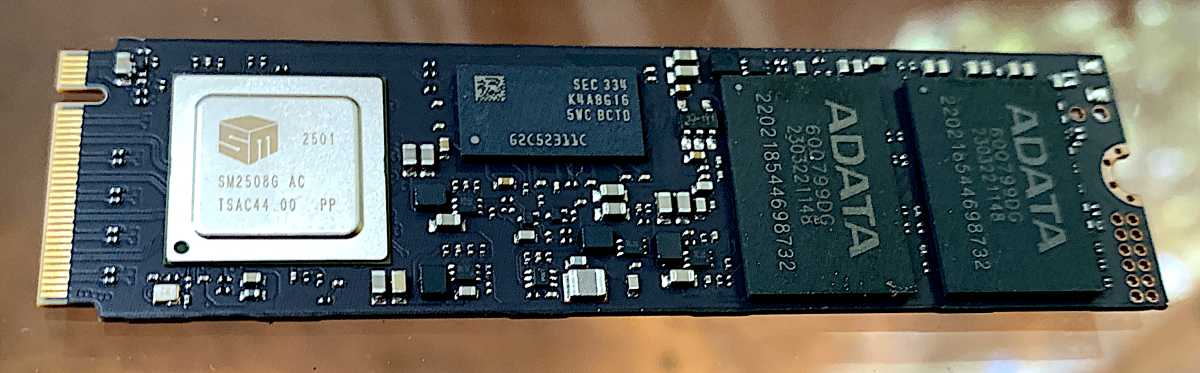
The Mars 980 Blade is a PCIe 5.0 x4, NVMe 2.0, 2280 (22mm wide, 80mm long) SSD. It’s a DRAM design utilizing a Silicon Motion SMI SM2508 chip controlling 232-layer 3D TLC NAND. The DRAM is used for primary caching duties, which allows for superior random/small-file performance. Adata wouldn’t tell us how much is allotted, but from the two 8Gb Samsung chips on board our 2TB model, it seems to be 1GB per 1TB of capacity — normal practice.
Jon L. Jacobi
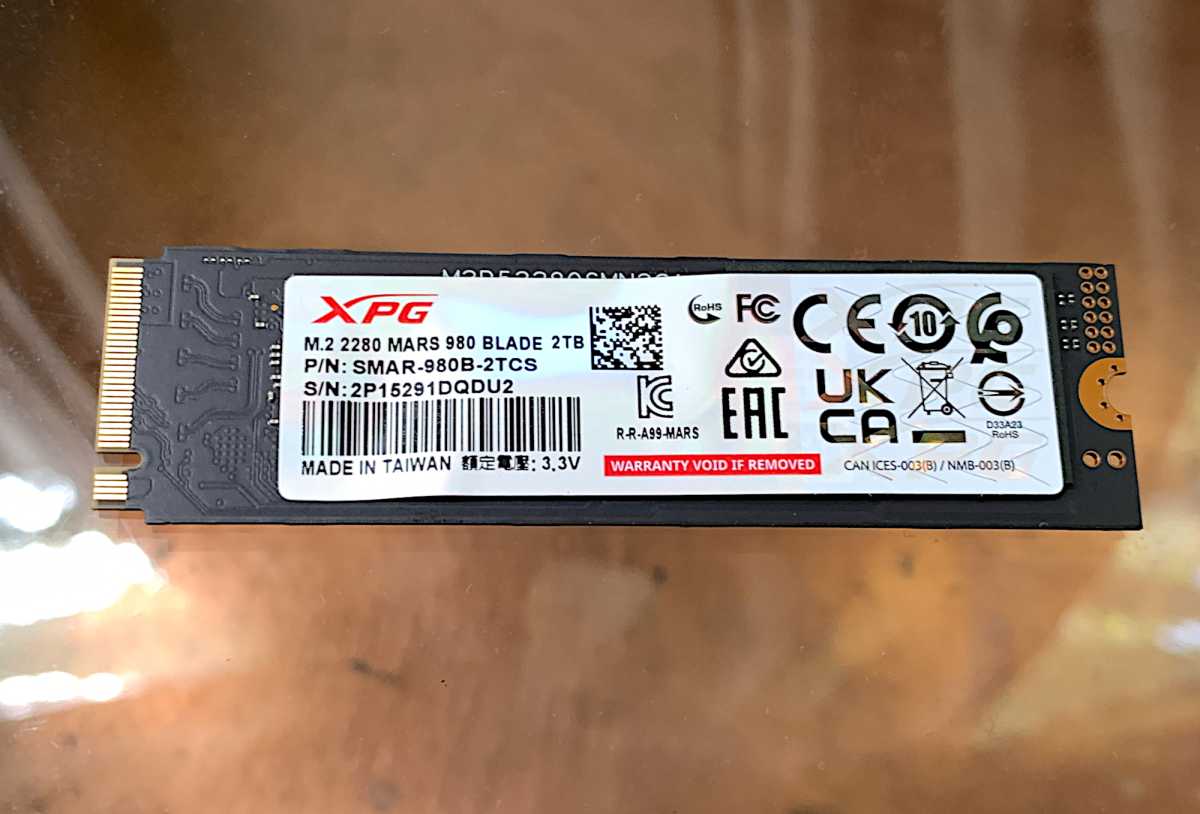
Adata provides a 5-year warranty with a 740TBW (terabytes written) per one terabyte of capacity rating for the Mars 980 Blade. That’s higher than usual 600TBW rating we see with high-end TLC. Nice.
How much is the XPG Mars 980 Blade?
I tested the $205 2TB version of the Mars 980; however, it’s also available in a 1TB capacity for $135, and soon, a 4TB capacity for $385. Those prices were provided by Adata and make the drive a very good bargain for a top-shelf PCIe 5.0 NVMe SSD with DRAM.
How fast is the XPG Mars 980 Blade?
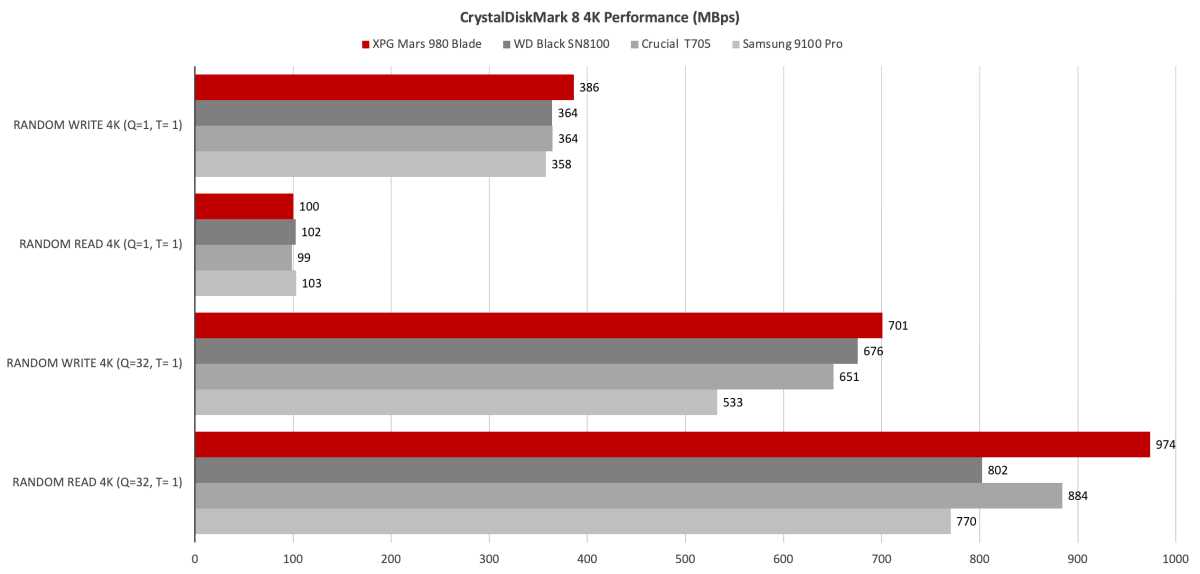
As stated up top, the Mars 980 Blade turned in the best random file write performance I’ve seen to date. Its 4K reads were also top notch. That’s according to all the synthetic benchmarks including CrystalDiskMark 8 and AS SSD.
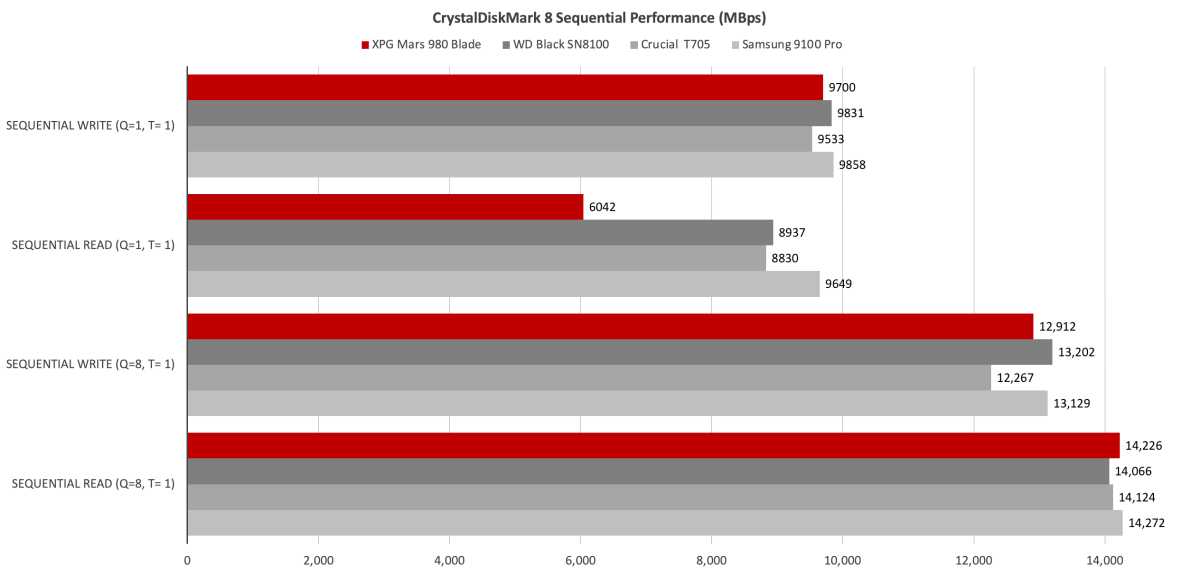
For some reason, however, it was quite a bit slower than the competition in sequential reads when only one queue and thread were involved. Beyond that, sequential transfers were on par with its competitors: the Sandisk WD Black 8100, Crucial T705, and Samsung 9100 Pro.
Shown below is the Mars 980 Blade’s outstanding 4K file performance. It basically trounced three very fast drives.
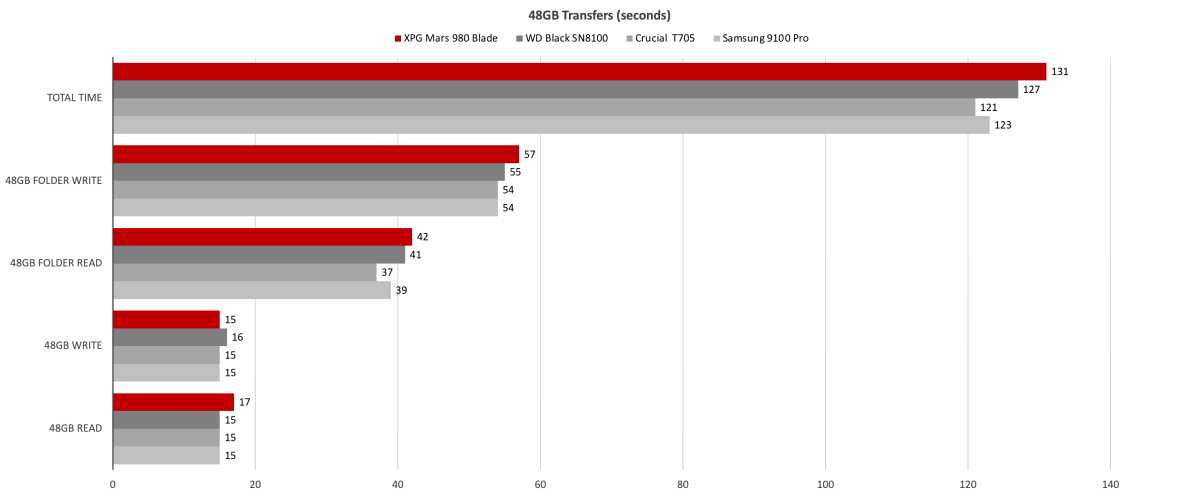
The Mars 980 Blade is obviously a great drive to run your OS. Operating systems perform myriad small read/write operations as a matter of course. But it was a bit off the pace in Windows file transfers. But only a bit.
Being 10 seconds off the Crucial T705’s pace ain’t bad at all for the Mars 980 Blade in our 48GB transfers, but it still amounts to fourth place among four drives.
The Mars 980 Blade’s outstanding 4K file performance trounced three very fast drives.
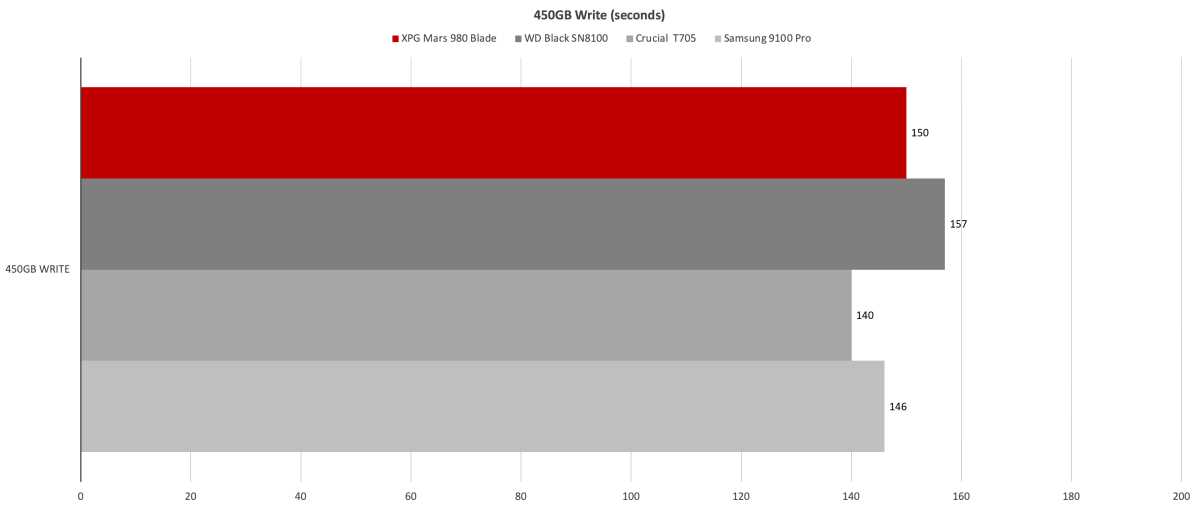
There’s not a lot of difference between the four drives when it comes to the 450GB write. The Mars 980 Blade snuck into third place among the four drives, but was 10 seconds slower than the number one rated Crucial T705.
The XPG Mars 980 Blade’s random 4K performance currently makes it the best NVMe SSD to run your operating system off of. Beyond that, it’s roughly on par with the other PCIe 5.0/DRAM competition. Overall, good stuff from Adata.
Should you buy the XPG Mars 980 Blade?
I say, heck yeah to this. Especially if you’re looking for a main drive to run your operating system. Of course, its competitors are also wonderfully capable, so my recommendation is qualified as a pick ’em based on current pricing. Also, make sure you need that last ounce of performance. If not, consider the far cheaper host memory buffer options.
How we test
Our storage tests currently utilize Windows 11 (22H2) 64-bit running on a Z790 (PCIe 5.0) motherboard/i5-12400 CPU combo with two Kingston Fury 32GB DDR5 modules (64GB of memory total). Intel integrated graphics are used. The 48GB transfer tests utilize an ImDisk RAM disk taking up 58GB of the 64GB total memory. The 450GB file is transferred from a Samsung 990 Pro 2TB, which also contains the operating system.
Each test is performed on a newly formatted and TRIM’d drive so the results are optimal. Note that as any drive fills up, performance will decrease due to less NAND for secondary caching, and other factors.
The performance numbers shown apply only to the drive we were shipped as well as the capacity tested. SSD performance can vary by capacity due to more or fewer chips to read/write across and the amount of NAND available for secondary caching (writing TLC/QLC as SLC). Vendors also occasionally swap components. If you ever notice a large discrepancy between the performance you experience and that which we report (systems being roughly equal), by all means — let us know.
Best Prices Today: XPG Mars 980 Blade
Author: Jon L. Jacobi, Contributor, PCWorld

Jon Jacobi is a musician, former x86/6800 programmer, and long-time computer enthusiast. He writes reviews on TVs, SSDs, dash cams, remote access software, Bluetooth speakers, and sundry other consumer-tech hardware and software.