

At a glance
Expert's Rating
Pros
- Decently affordable for USB 3.2×2
- Good 20Gbps performance
- Maintains decent speed during uber-long writes
Cons
- Not the fastest of the breed
- Low TBW rating
- Cheap internal tray fasteners didn’t hold up to multiple removals
Our Verdict
Good 20Gbps performance and handsome looks are Addlink’s formula for the P21 external SSD. It also maintains solid numbers when writing off secondary cache. The issue is that cheap internal fasteners didn’t stand up well in even our limited use.
Price When Reviewed
This value will show the geolocated pricing text for product undefined
Best Pricing Today
Best Prices Today: Addlink P21 USB 3.2×2 (20Gbps) SSD

If you’re looking for better-than-average 20Gbps performance that won’t break the bank, then Addlink’s P21 belongs on your short list. And thanks to modern TLC NAND, the write rate doesn’t sink precipitously when it runs out of secondary cache. Our only qualms and the low TBW rating and a rather weak locking system for the outer shell.
Read on to learn more, then see our roundup of the best external drives for comparison.
Editor’s note: This review was updated May 14, 2025 to correct errors in the hardware specifications, as well as to report issues with the less-than-sturdy internal construction that revealed itself over time. As a consequence of these issues, the rating has dropped from 4 to 3 stars.
What are the Addlink P21’s features?
The Addlink P21 is a USB 3.2×2 (20Gbps) external SSD with NVMe internals. The SSD inside uses a Phison PS5015-E15 controller, which means it’s DRAM-less PCIe 4.0 — it uses your device memory for primary caching duties. The NAND is 162-layer TLC, and of a modern variety according the test results.
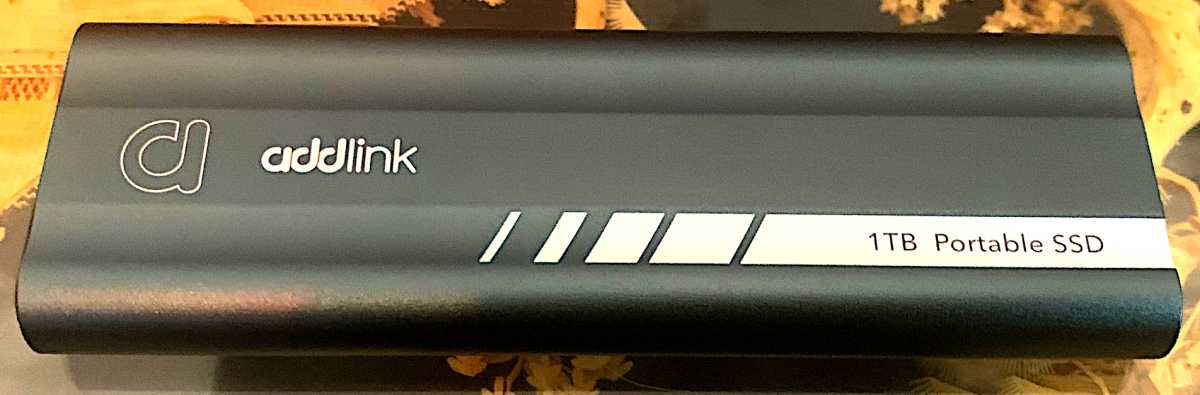
Though my artistic photos obscure the fact, the P21’s housing is actually midnight blue, not dark gray. It’s an aluminum-shelled enclosure that measures approximately 4.5-inches long, by 1.5-inches wide, by a half-inch thick and weighs 1.9 ounces. For what it’s worth, I find it a cut above average in appearance.
One end of the drive sports the Type-C port and status light, while the other is home to a button that unlocks the slide-out tray that houses the electronics and NVMe SSD. That’s a bit unusual with pre-populated drives, and more normally a feature of buy-your-own-drive enclosures.

The P21 is warrantied for five years, but sports a rather low 300TBW rating (terabytes that may be written under warranty). That’s about half the TBW we normally see with TLC SSDs. It’s more in line with QLC SSDs, so I’m not sure of the reasoning.
A button on one end of the P21 unlocks a slide-out tray that houses the electronics and NVMe SSD — an uncommon feature in pre-populated drives.
May 14, 2025: After revisiting the drive to verify the vendor’s requested correction, the P21 would not enumerate — i.e., the system could not identify the drive. The issue turned out to be that the swiveling rubberized retainer for the NVMe SSD (the black tab near the left end of the image above) didn’t hold the SSD tightly enough against the M.2 slot. Simply jostling the unit around a bit (admittedly I’m a bit, but only a bit, rough with external SSDs) caused the SSD to slip out of the slot.
Not only that, but the little tab fell out at one point, forcing a search of the surrounding area.
Additionally, the plastic tab that holds the tray in place inside the aluminum shell proved insufficient to the task. I removed the tray several times, and apparently that was too much. It no longer took sliding the switch to extricate the tray, only a mild push.
I may not have been as gentle with the P21 as I should have, but the design is simply not robust at the most likely failure points. Addlink also sells the enclosure separately as the B21.
How much does the Addlink P21 cost?
The P21 retails for $84.44/1TB, $149.44/2TB, and $312.44/4TB flavors according to Addlink PR. But at this writing, it can be found for less on Amazon, with the 2TB and 4TB going for $138.44 and $288.44, respectively. While the quoted prices are decent for 20Gbps 3.2×2 storage, prices in the category have dropped dramatically recently due the advent of USB4.
I must admit that I find it a bit puzzling that vendors continue to release USB 3.2×2 SSDs rather than the more compatible USB4. Not that I don’t love a 20Gbps transfer rate, but USB 3.2×2 drops to 10Gbps on most Thunderbolt ports, whereas USB4 does not.
How fast is the Addlink P21?
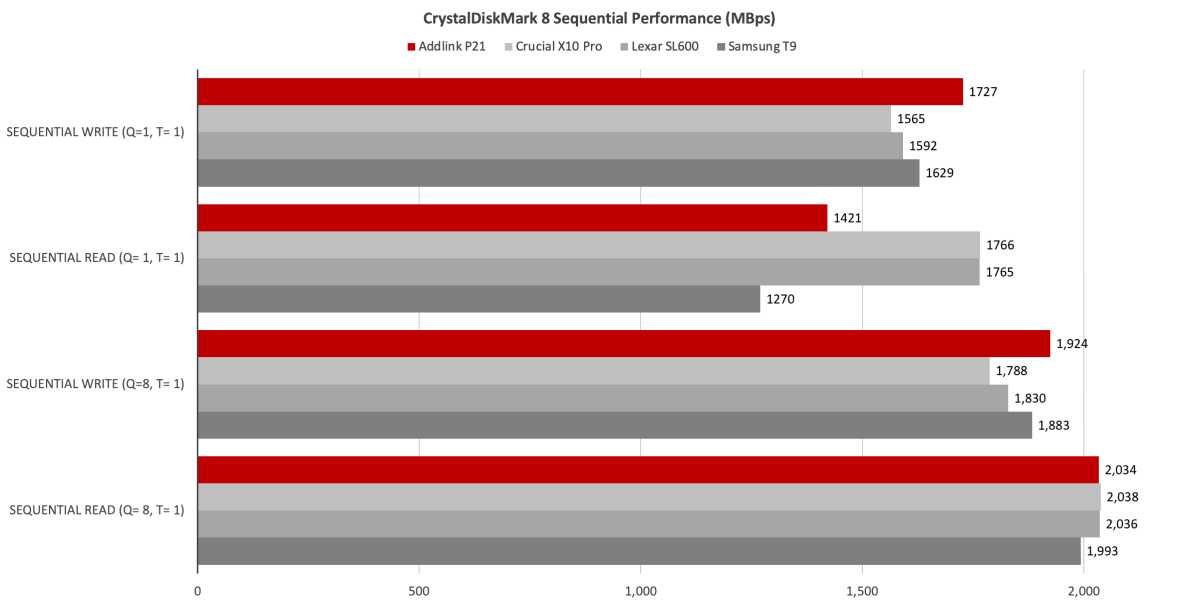
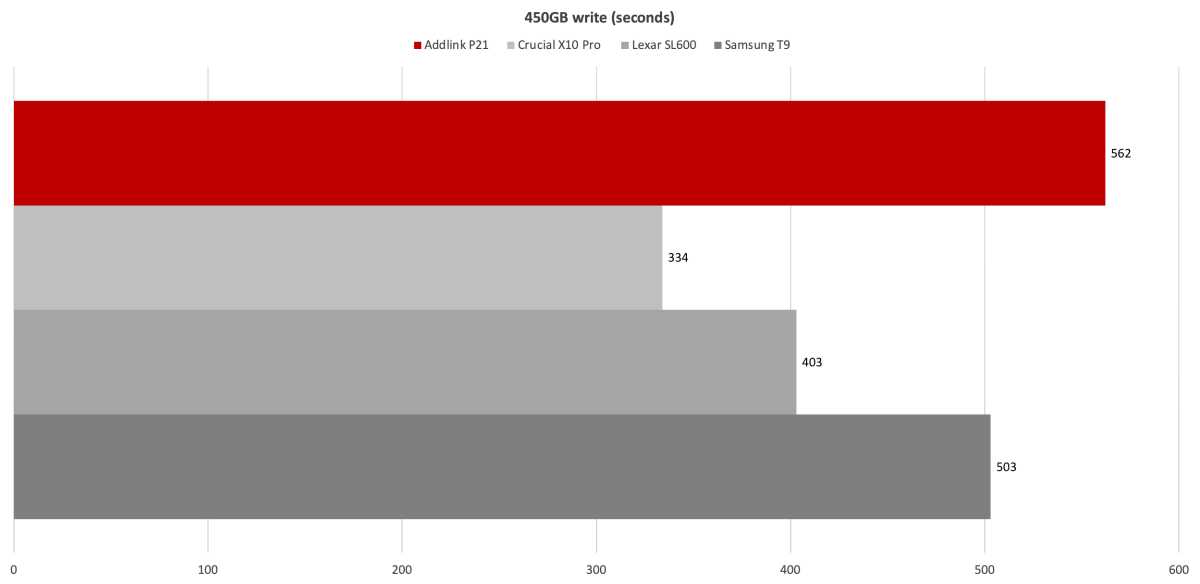
The Addlink P21 isn’t the fastest USB 3.2×2 (20Gbps) SSD I’ve tested, but it’s hardly the slowest either — 7th among 16 drives of its ilk overall. If Addlink had sent me the 2TB version (like the other drives in the charts), it would likely have written the 450GB file more quickly and ranked higher.
Bear in mind that all 20Gbps SSDs are pretty fast, and as you can see below, CrystalDiskMark 8 thought very highly of the P21 — reinforcing my theory about the 2TB version possibly ranking higher.
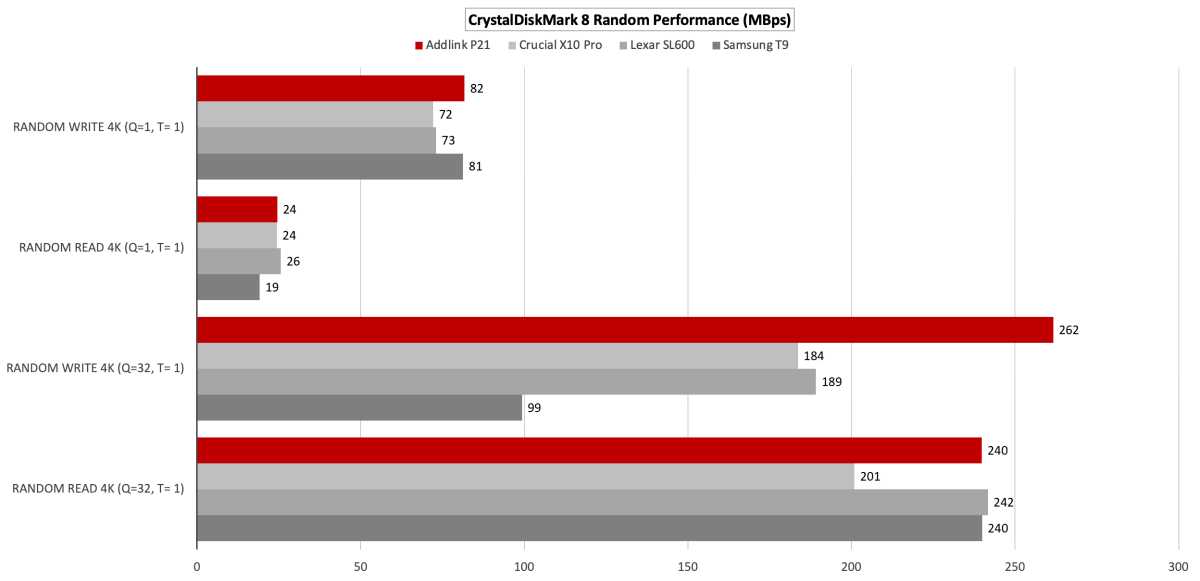
CrystalDiskMark 8 was equally high on the P21’s random 4K transfer abilities. It blew away the other drives in the queued write test. Note that Windows does not use NVMe queues.
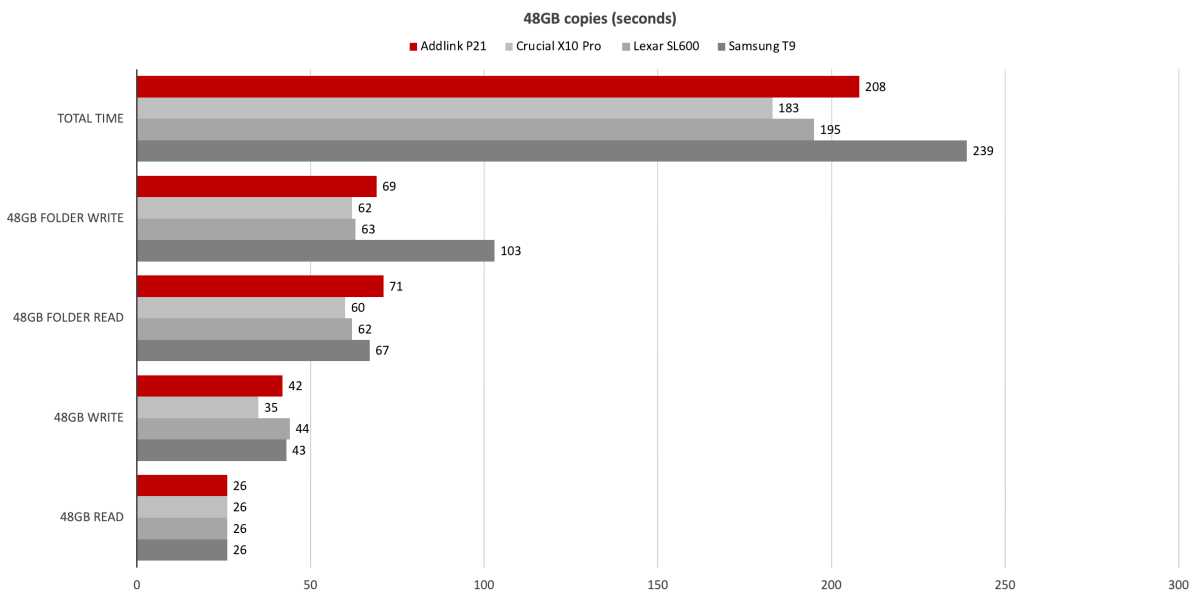
The P21 was very fast in our 48GB transfers, but was sabotaged to some degree by a slow folder read. The Crucial X10 Pro is aces at this kind of stuff. The other drives are the Lexar SL600 and Samsung T9.
The 1TB P21 ran out of secondary cache in about half the time of the 2TB competition, with the write rate dropping to the TLC’s native 650MBps to 850MBps. Most 2TB SSDs have enough secondary cache that the writes will never slow during this 450GB write.
Note that the P21 never dropped below 600MBps even during multiple consecutive 900GB writes. Of course, this is more a testament to modern TLC which writes natively at the described speeds, than anything Addlink or Phison did. But there’s nothing worse that watching your SSD write below 100MBps as sometimes happened with old TLC and still happens with modern QLC.
Again, the P21 might’ve ranked quite a bit higher if I’d tested the 2TB version. I’m going to go out on a limb here and rate it on par with everything USB 3.2×2 I’ve tested — other than the Crucial X10 Pro, which is a beast in real-world transfers.
Should you buy the Addlink P21?
Despite the low TBW rating and less-than-robust internal structure, the P21 could be a decent buy — if you find it dirt cheap. It’s is a good performer, good looking, and won’t break the bank. But competition is fierce and any of the other SSDs on the charts will serve you well, and likely for longer.
Please note that 20Gbps USB ports are hardly universal. If you don’t have one, go 10Gbps for a lot less money, or USB4.
How we test
Our storage tests currently utilize Windows 11 (22H2) 64-bit running on a Z790 (PCIe 5.0) motherboard/i5-12400 CPU combo with two Kingston Fury 32GB DDR5 modules (64GB of memory total). Intel integrated graphics are used. The 48GB transfer tests utilize an ImDisk RAM disk taking up 58GB of the 64GB total memory. The 450GB file is transferred from a Samsung 990 Pro 2TB, which also contains the operating system.
Each test is performed on a newly formatted and TRIM’d drive so the results are optimal. Note that as any drive fills up, performance will decrease due to less NAND for secondary caching, and other factors.
The performance numbers shown apply only to the drive we were shipped as well as the capacity tested. SSD performance can vary by capacity due to more or fewer chips to read/write across and the amount of NAND available for secondary caching (writing TLC/QLC as SLC). Vendors also occasionally swap components. If you ever notice a large discrepancy between the performance you experience and that which we report (systems being roughly equal), by all means—let us know.
Best Prices Today: Addlink P21 USB 3.2×2 (20Gbps) SSD
Author: Jon L. Jacobi, Contributor, PCWorld

Jon Jacobi is a musician, former x86/6800 programmer, and long-time computer enthusiast. He writes reviews on TVs, SSDs, dash cams, remote access software, Bluetooth speakers, and sundry other consumer-tech hardware and software.